
Every server, one console
KNet SAM brings your Linux, Windows and macOS machines into one web console through lightweight agents - on your own infrastructure.
- Terminal and remote desktop in the browser
- Monitoring, alerts and network devices
- Private WireGuard overlay network
- Agents dial out: no inbound ports
Infrastructure software for IT teams
Each KNet product runs on your own servers with Docker and does one job well.

KNet SAM
One web console for your servers, through lightweight agents: a web terminal and the remote desktop, monitoring and alerts, network devices and access control - and updates and software too. For Linux, Windows and macOS, on your own infrastructure.
 Free
FreeKNet Magpie
A private Docker image registry with a web interface, single sign-on, personal access tokens for the Docker CLI and role-based access.
 Coming soon
KNet IPAM
IP address management for IT teams. We will announce it here when it is ready.
The agent connects to your KNet SAM, you work in the browser
Each machine runs a small agent that keeps one connection open to your KNet SAM server. You and your team work in the web console; scripts use the same API.
An agent on each machine
Linux, Windows or macOS. It reports the machine's state and runs the tasks SAM sends - only those its local policy allows.
KNet SAM on your server
Self-hosted with Docker or on Kubernetes, with its own PostgreSQL database. It keeps the inventory, checks every request against roles and machine groups, and logs every change.
You, in the browser
Dashboards, updates, terminal and desktop, alerts and reports - or the REST API with a personal token.
What you do with it, day to day
Terminal and desktop in the browser
Open a terminal or the graphical desktop of any machine from the console. It runs through the agent's own connection to SAM, so nothing new is opened on the machine.
- Persistent shells, tabs side by side, one command to several machines
- Remote desktop with shared sessions and session recording
Know what needs you
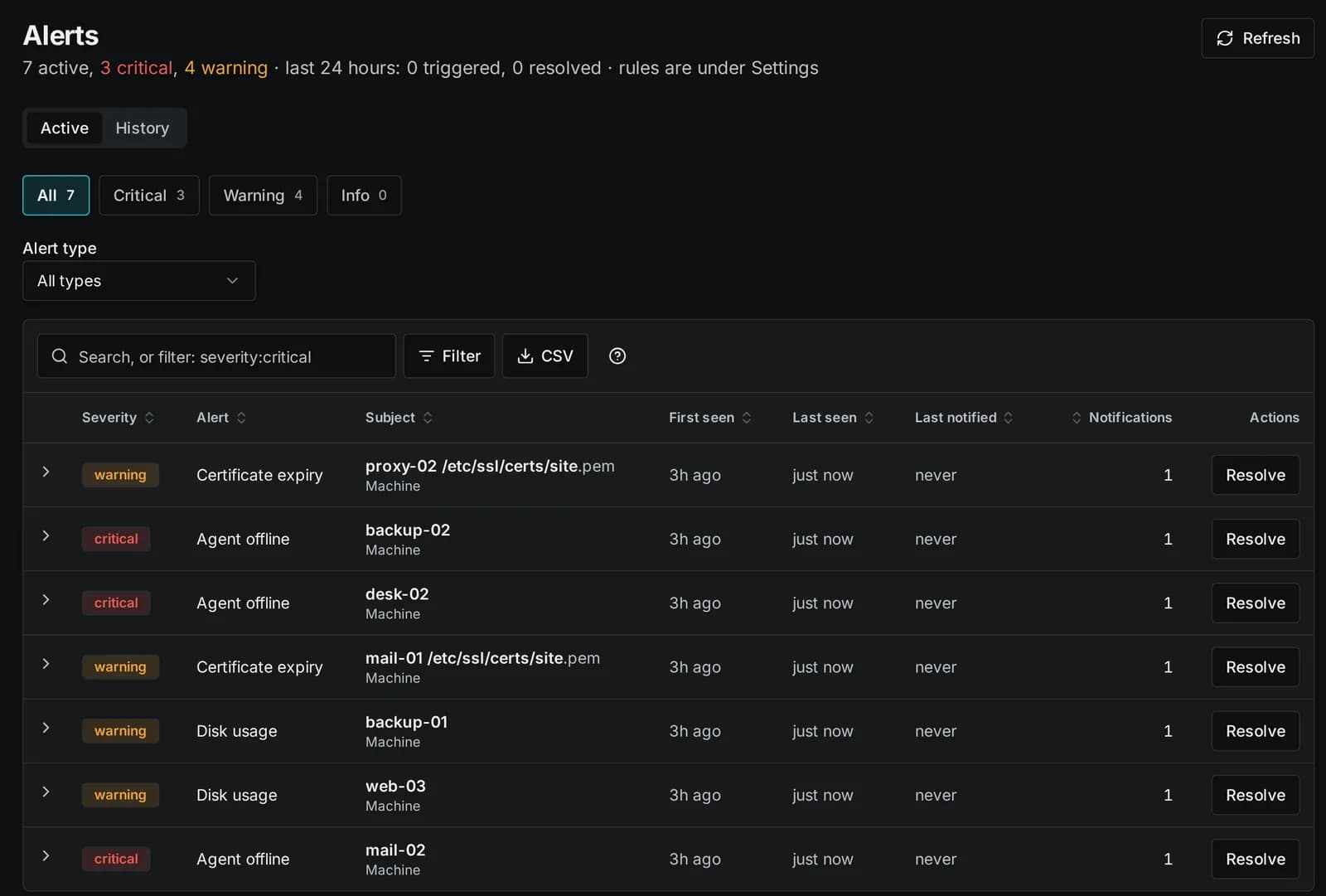
Health, disks, certificates, scheduled checks and configuration drift, with alerts in the console, by e-mail, to webhooks and to your ticketing system.
- Alerts with severity, history and a recovery message
- Uptime and incidents per machine
- Reports as PDF or CSV, by mail on a schedule
You stay in control of each machine
Each machine has a local policy that says what SAM may do there - commands, terminal, desktop, files, software, firewall and more. The agent enforces it; the server cannot override it.
- Keep a machine to monitoring only, or allow just what it needs
- Refused requests raise an alert; policy changes are in the audit log
- Monitoring and inventory always on
- Install pending updates allowed
- Run commands and scripts allowed
- Terminal allowed
- Remote desktop and screen sharing not allowed
- Browse and download files allowed
- Upload, change and delete files not allowed
- Change the firewall not allowed
Keep every machine up to date
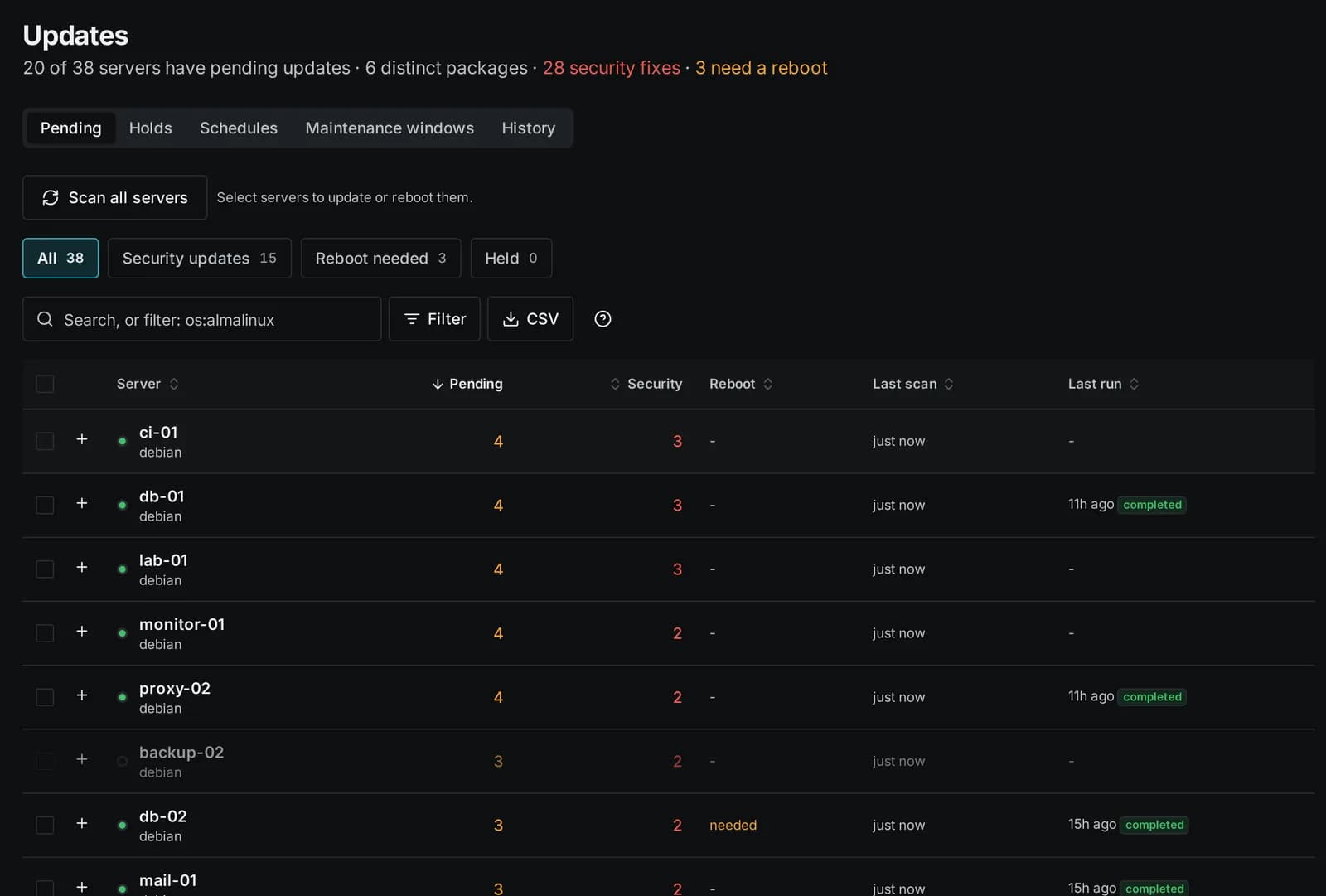
See pending and security updates across the fleet, then update in waves, hold what must not move and reboot only where it is needed.
- Linux package managers, Windows Update and winget, Homebrew on macOS
- Update runs in waves that stop on a failure, on a schedule or at once
- A software catalog says what should be installed where
Your servers, your data, your rules
What every KNet product has in common.
Self-hosted
Runs on your own infrastructure in Docker. Your data stays with you.
Single sign-on
Sign in with your identity provider over OpenID Connect, with multi-factor authentication for local accounts.
Role-based access
Owners, administrators, operators and viewers each see and do only what their role allows.
Audit trail
Changes and sign-ins are logged, so you can always see who did what and when.
Frequently asked questions
Not answered here? Send us a message.
Product
What is Karlonet?
Karlonet is the name of the KNet product family: infrastructure software for IT teams. The products are made by Oslon IT Limited.
What is KNet SAM?
KNet SAM (Karlonet System Agent Management) manages servers and workstations through a lightweight agent on each machine. From one web console you open a terminal or the remote desktop, watch health and alerts, see your switches and firewalls, decide who may do what - and keep the machines updated. See KNet SAM.
Which systems does KNet SAM support?
Agents run on Linux (Debian, Ubuntu, the RHEL family, SUSE, Arch and other distributions with systemd, and Alpine), on 64-bit Windows and on macOS 12 or later (Apple silicon and Intel). Switches, access points, routers and UPS are read over SNMP; Palo Alto, FortiGate and Meraki firewalls also through their API (Enterprise edition).
What does the overlay network do?
KNet SAM runs a private WireGuard network of its own. Every machine gets an address in your installation's private range and reaches SAM through an encrypted tunnel. Machines reach each other only where a grant allows it, on the ports and for the time it names, directly where their networks allow it. Laptops and phones can join with the WireGuard app. See the overlay network.
Does KNet SAM change my firewalls or switches?
No. Network devices are read over SNMP and supported firewalls through their API: SAM only reads, it never changes a device. Where it suggests a change, for example cleaning up unused firewall rules, it shows the commands for you to review and apply yourself.
What are KNet Magpie and KNet IPAM?
KNet Magpie is a free private Docker image registry with a web interface, single sign-on and personal access tokens - see KNet Magpie. KNet IPAM, IP address management, is coming soon.
Buying and licences
How do I buy a licence?
In the Karlonet store. You receive a licence key, and the owner of your KNet SAM installation pastes it in Settings -> License.
What is the difference between Community and Enterprise?
Without a licence key KNet SAM runs as Community, for up to 100 agents. The Enterprise edition adds features such as the firewall tools (policies, analysis and trends for Palo Alto, FortiGate and Meraki), the AI features and the firewall parts of compliance. What each edition includes and what it costs: see the store.
How are licences counted?
By the number of agents on servers (support clients and personal devices do not count). SAM warns at 80 % of the licence; up to 10 % over is only a notice. Only when you stay more than 10 % over for 30 days does SAM stop accepting new agents - existing machines, features and data keep working.
Is there a trial?
Yes. To look around first, open the live demo (opens in a new tab) and sign in as demouser with the password demouser: made-up machines, nothing to install, reset every night.
For a trial on your own servers, contact us and we will set one up for you.
How do renewals work?
A renewal, or more agents, is simply a new key from the store. Paste it in Settings -> License to replace the old one; nothing is reinstalled.
What happens when a licence ends?
An ended commercial key keeps Enterprise in the KNet SAM releases made on or before its end date, so you keep what you paid for; later releases need a renewed key for Enterprise. Trial keys simply stop. Removing a key returns to Community; nothing is deleted.
Does the licence check need the internet?
No. The key is checked offline, inside KNet SAM. SAM never contacts our licence server, and it sends us nothing on its own: no usage data, no update checks.
The one thing that can reach us is a bug report that someone in your organisation chooses to send with Report a bug. You can switch bug reports off in Settings -> Network -> Outbound connections, where every other outside lookup SAM can make (vulnerability data, address registries, firewall advisories) has its own switch too; none of those goes to us.
Do KNet products contact Karlonet?
KNet SAM and KNet IPAM never do. They hold credentials and reach into your network, so they are licensed offline and send us nothing on their own.
Other KNet products that need a licence check it with our licence server. Their pages and the store say what they send and when.
Is KNet Magpie really free?
Yes. KNet Magpie is free and needs no licence key. Get it from the store.
Security and privacy
How do the agents connect? Is anything opened on my machines?
Agents only dial out. Each keeps an encrypted connection to your KNet SAM server, and nothing connects into the machines: they only need to reach SAM over HTTPS (port 443). Terminal and desktop sessions travel through that same connection. The optional overlay network adds an outgoing WireGuard tunnel.
What may KNet SAM do on my machines?
Only what the machine's local policy allows. Whoever runs a machine chooses, on the machine itself, which kinds of actions SAM may perform - commands, terminal, desktop, files, software, firewall and more - or keeps it to monitoring only. The server cannot override it; refused requests raise an alert, and changes to the policy are recorded. See local policy.
How is access to KNet SAM protected?
With roles from viewer to owner, machine groups that decide who sees which machines, two-factor authentication, single sign-on with OpenID Connect, SAML or LDAP, and SCIM provisioning. Accounts can be limited to your internal networks, and open remote sessions lock when nobody uses them.
Is there an audit log?
Yes. Every operation is recorded: who did what, on which machine, and when. The entries are sealed in a chain of hashes, so a changed or removed entry is noticed; SAM checks the chain every night and raises an alert at a break.
How do I know an agent update is genuine?
Agent releases are signed, and an agent refuses an update without a valid signature. Agents also verify the SAM server's certificate.
How are passwords and keys stored?
Stored credentials and the secrets of integrations (single sign-on, mail, ticketing and others) are encrypted at rest. Passwords typed for sudo are masked and never stored or written to the audit log.
Where does my data stay?
On your KNet SAM server. Agents send their data only to your SAM. The few connections SAM makes to the internet itself (vulnerability data, address owner look-ups, bug reports) are listed in its settings and can be switched off, and the AI features stay off unless your organisation sets up a provider.
What does this website collect?
First-party visitor statistics without cookies or stored IP addresses, and what you send through the contact form. The details are in the privacy policy.
Deployment and requirements
Is KNet SAM self-hosted or hosted?
Self-hosted: you run it on your own servers, in Docker or on Kubernetes, with its own PostgreSQL database, so your data stays on your infrastructure. If you would like to talk about other arrangements, send us a message.
What do I need to run it?
A Linux server with Docker, or a Kubernetes cluster, and an address that your machines and your team can reach over HTTPS. Everything else, including the database, runs in containers.
Can KNet SAM run highly available?
Yes. An installation can run on two nodes and a small witness. The database is replicated synchronously, and when the primary fails the standby takes over automatically, within seconds to about 40 seconds.
Can KNet SAM run on Kubernetes?
Yes. One Helm chart installs the whole application: the web app, the API, the workers, PostgreSQL and the cache, with generated secrets, non-root containers and an ingress for your address. Kubernetes restarts what stops and starts SAM on another node when one fails, your storage replicates the data, and an upgrade is one helm upgrade command. The documentation for customers walks through every step.
Can one installation serve several organisations?
Yes. Several organisations can share one installation, kept apart by the database itself, each with its own settings, sign-in providers, audit log and overlay range.
How is KNet SAM itself backed up?
SAM backs itself up on a schedule, encrypted with your passphrase, to S3, SFTP or SMB storage.
How are agents installed and kept up to date?
With one command per machine, copied from the console (Linux, Windows and macOS; Windows also as an MSI package). New agent releases are rolled out from the console, to a few machines first if you like.
Support
How do I reach you?
Use the contact form: it is the best way to reach us, and we answer by e-mail.
If you prefer to write an e-mail yourself:
How do I report a bug in KNet SAM?
Use Report a bug at the bottom of any KNet SAM page. The report comes straight to us, with a screenshot only if you add one, and you get a report number to mention when you write to us. The owner of an installation can switch the button off in Settings.
Where do I find help with using KNet SAM?
In the KNet SAM manual, which describes every page step by step; signed-in readers find it under Docs. For anything else, send us a message.
Where do I manage my licence or order?
In the Karlonet store.
Ready to get started?
Licences and downloads are in the Karlonet store. Questions? Send us a message.